Content videos for your event Loved the event, great insights and content there. Here are the keynotes to begin with, let us know what your thoughts are! Please note these are the full length keynotes, we recommend some tweaks and changes.
Ed Pank
We recommend starting the presentation at ‘I would like to start with a question’ https://vimeo.com/90189253
Todd Wheatland
The man is passionate. We recommend starting at about 0.50. https://vimeo.com/90282426
Darren Woolley
This is the full presentation; we recommend starting around 0.53 when Darren talks about what Trinity P3 does. https://vimeo.com/90123568
Highlights of speakers
https://vimeo.com/90291858
Panel Discussion
We recommend segmenting this in shorter videos, potentially good blog material. Part 01 https://vimeo.com/91502585 Part 02 https://vimeo.com/91984933
Cam Barnes
Promising, could be quirky https://www.youtube.com/watch?feature=player_embedded&v=SWsZGaRUTJ4
Tony Rebel
Looks good, we have to see if he can present. https://www.youtube.com/watch?feature=player_embedded&v=uMr0nepZuUI
Craig Walker
Decent acting, have to see what his presenter skills are. https://www.youtube.com/watch?feature=player_embedded&v=zQHY78eXjuE
Paul Armstrong
Relevant experience, professional. http://vimeo.com/80135728
Paul Padagas
Relevant experience, professional. http://vimeo.com/51368731 https://www.youtube.com/watch?feature=player_embedded&v=-7sh4UwgHCk
Sean Rodrigo
Looks good, presenting experience https://www.youtube.com/watch?feature=player_embedded&v=Tipywe7uj4c
Fabrizio Omodei
Good actor, have to cast for presenting skills https://www.youtube.com/watch?feature=player_embedded&v=zGb_FTyfdb8
Luke Dumet
Can’t tell from the reel if he can present. https://www.youtube.com/watch?feature=player_embedded&v=I2mhs1E1elo
Leon Lester
The showreel doesn’t look that good, but he’s a good type for Flexi. Maybe worth doing a cast with. https://www.youtube.com/watch?feature=player_embedded&v=UR2hWFW6skQ
Dominic McDonald
Actor, need to cast for presenting experience
Some examples of multicam webcasts HWP has produced
Here are some examples of multi cam shoots and webcasts we have produced. Please note that the lighting in the room and the setup of the stage have a big impact on how good things look, so it would be worth while to work together on developing some affordable and effective ways to give it that TED look.
Liveperson Speaker Highlights
http://vimeo.com/67054515
Our multi camera option
http://vimeo.com/58422843 http://vimeo.com/58422126
Panel discussions
http://vimeo.com/58677710
Tracerco presentation at AOG vo2
Here’s the second version of the keynote. https://vimeo.com/89896933 We have a few questions regarding the previous feedback: We created a shortlist of three pieces of music for the intro, could you pick one please? Feel free to have a browse on Neosounds.com if you’d like this to take a different direction. https://www.neosounds.com/playlists/8998 Here are some other queries: – What would they like to do with the top left logo? – Intro – Have changed the spacing around the Tracerco logo, is that enough space? – Slides – Cannot make the slides go flush to the edge of the screen, due to the slides being 4:3 and not HD size like the video. We can stretch them but that will make the look pixellated. An alternative would be to resize the slide deck so Power Point fills out with white to the edges and edit those in where applicable. – Have made changes regarding slides, except the change at 11:22 (showing access under the pipe) we don’t have the slide/animation to use there. Could you share a high resolution version of that please? – Have highlighted the slides at 13:00 & 13:39 using circles. – Can we use the Shell logo in the edit? Just checking if there’s permission. It would be interesting to have a look at how we can segment the content so you can use outtakes on the Tracerco website. https://vimeo.com/89896933

What’s the story with the black bands?
We’ve been getting some questions around black bands appearing on web videos so we though it might be helpful put the solution on the ol’ HWP Blog. Sometimes when you embed an video, you’ll notice those black bands on the top and bottom, or sometimes on left and right:
What’s going on here?
You can embed in any size you like, provided your aspect ratio is 1.77:1 or what they call in 16:9 in video production lingo. The aspect ratio is the ratio between the width and the height of a video. If you get the ratio wrong, you’re trying to force stretching the video in real time. Most machines and servers can’t handle that, so websites like Youtube will ‘letterbox’ or ‘pillar box’ your video, which are the black bands you see.
Calculating your ratio
When I was a kid my teacher banged on about how important it is to being able to do maths in your head, but I never saw the point because I had a Solar Powered Calculator. Who needs brains when you have one of those? Of course, now I’m a proper adult and have children of my own.. I still think it’s a waste of time: http://size43.com/jqueryVideoTool.html Just punch in the height or width you want in the Aspect Ratio calculator, et voila: correct aspect ratio:
How to change how the video displays
The default embed code plays the video at 560×315 but you can tweak the embed code and change the size yourself. This is the standard embed code from Youtube you get when you click the Share>Embed button under the video: 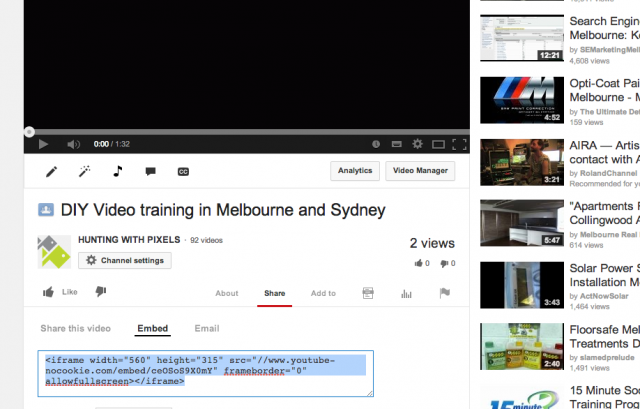 Add the embed code to your page in ‘text’ or ‘html’ mode, depending on what platform you work in and simply adjust the values of ‘width’ or ‘height’: <iframe width=”560″ height=”315″ src=”//www.youtube-nocookie.com/embed/ceOSoS9X0mY” frameborder=”0″ allowfullscreen></iframe>
The Agile Future Playlist
How to embed
Just go do the ‘share’ button under the playlist and either share directly to one of your social media platforms or use and embed code.
Using an embed code
There are a few interesting options you can add to the player, but one I’d definitely add is a bit of extra HTML code; ‘rel=0’, which turns related videos off. Here’s a great resource for turning on/off Youtube player parameters: https://developers.google.com/youtube/player_parameters
Brandless video around clever business
Hey Angelique, Here’s your video. We felt that without the brand it’s not clear why you’re watching, so we recommend giving it a title like ‘the value of masterminding in a group’ or something similar where you start with a quote about collaboration and end with a call to action that’s more general in terms of peer mentoring/group support. For Youtube maybe create one that has your new URL? https://vimeo.com/88039257
New videos
Here are the latest versions of your videos.
Mammography – FINAL
https://vimeo.com/125539874 embedded
Mammography edit 150421 from Hunting With Pixels on Vimeo.
Sonography – FINAL
https://vimeo.com/125539877
PET – FINAL
https://vimeo.com/125539875
Radiology – FINAL
https://vimeo.com/125539876
Nuclear – FINAL
https://vimeo.com/125549660
Segment – MRI: Dealing with claustrophobia
Here’s an example of a segment we could take out of the main video to address specific questions. This way we could make shorter overview videos by adding links to more specific subject that don’t apply to the majority of patients. https://vimeo.com/107443667
CT V03 – FINAL
https://vimeo.com/107215684
X-ray – FINAL
https://vimeo.com/107215687
MRI Adult – FINAL
https://vimeo.com/107444493
MRI For Children – FINAL
https://vimeo.com/107441207
Ultrasound – FINAL
https://vimeo.com/107445765
Video feedback
Please add your feedback to this Google doc: https://docs.google.com/document/d/1GCaRSaB3ArzNYiiJyK9SfOgeb2zRDUdk_LK-FI-uh-M/edit?usp=sharing Please note this link only works if we set you up as a collaborator, so please contact us if you’d like to be one.
Content look and feel
Derek has created this storyboard based on the content document: https://www.dropbox.com/s/wkf7k58dqi9f78z/IMED%20SHOOT%20-%20HWP.pdf The central principle of the videos is that we get a conversational looking interview with experts to cover all the content that we currently have the the ‘content’ document: https://docs.google.com/document/d/1vKJZUyVNeFD3Rli2zRaPN7PRTjG02Td9CkBz5i1zpwc/edit
Getting your reviews right
It’s very important to not miss essential details when you review your videos, so please take a few minutes to have a look at this document on getting reviewing right. This workflow will ensure costs and timelines of your project don’t blow out. https://www.huntingwithpixels.com/how-we-work/video-reviewing-get-right/
Assets
You can deliver assets by either putting the into the Dropbox folder we share with you or sending them via email. Here’s the link to your Dropbox folder: https://www.dropbox.com/sh/k4bh8zi6t9c2gov/EWgHLn5avW
Welcome to Hunting With Pixels
This page gives you an overview of ongoings. If you want to read more about how we work, follow this link: How We Work.
Production ongoings WOB
Here’s a calendar of all your ongoings: all your main milestones are in this calendar:
- Review dates and deadlines
- Production delivery
- Asset management
If you like we can automatically send you updates and alerts via email. For a smooth production and delivery it’s very important we all stick to the timeline we agreed on. To subscribe to this calendar, follow this link:
New videos
Here’s your newest video https://vimeo.com/91397544
Video feedback
Please add your feedback to this Google doc: https://docs.google.com/document/d/1ca0vy_yqm-9RkCfu65Yi1yevBVGZWgTmtvIvbSgwGkw/edit?usp=sharing
Getting your reviews right
It’s very important to not miss essential details when you review. Here’s a workflow that ensure costs and timelines don’t blow out due to insufficient reviewing: https://www.huntingwithpixels.com/how-we-work/video-reviewing-get-right/